Who Won?
First, I'd like to take a moment and thank MyMemories.com for sponsoring this giveaway. I really enjoyed using their product, and I believe you will too.
Also, I'd like to thank everyone that participated in the giveaway. Not only did you read my blog post, but you entered my contest. A big thanks to you.
Thirdly, I'd like to thank all my readers for coming back again and again to read my family's stories. I really appreciate it. Thank You.
And the winner is... Leslie Ann! When you get a chance go check her blog out: Ancestors Live Here. Congrats, Leslie! I hope you enjoy the software!!
Don't Forget: If You Didn't Win...
MyMemories.com has given me a coupon to give to y’all worth $10 off the purchase
of My Memories Suite Scrapbook software. Just enter in this code at checkout STMMMS76098 (For best results, just copy and paste it).
And? You also get a $10 coupon for the MyMemories.com store when you purchase
the software.
~C

Wednesday, September 28, 2011


Wednesday, September 21, 2011
Jerks, Genea-Karma, Donuts & Dreams
About six months ago I received a
request to photograph a tombstone located in a small cemetery near my
neighborhood. I, of course, looked up the cemetery because I’d never heard of
it and I’d driven right by there to take my son to basketball practice and I
didn’t remember seeing a cemetery.
I found a four page transcription of
the tombstones in the cemetery online, quickly found my dude, Mr. Gressett [who
had the same last name as my college roommate at Texas A&M University,
and I fleetingly wondered if they were related], and put my graving outfit on
[What? You don’t have an outfit for graving?]
I thought to myself, “This shouldn’t
be too bad. It’s a small cemetery.” I also thought I’d photograph all of it if
it was indeed small. After all, I already had the transcription spreadsheet in
hand. What could go wrong, right?
When I will learn not to ask myself
that question I’ll never know. Anywho, I
went and searched for it. Drove right past it. [Of course] Turned around and
slowed down at the empty overgrown lot that had a few trees.
“You’ve got to be kidding me.” [Yeah.
I talk to myself in the car. And in my office.]
I parked and thanked God I’d put my
graving outfit on –jeans, long-sleeved shirt, and Timberland boots. I quickly
found the tombstone to fulfill the request, then started taking photos of each
tombstone, methodically going through the spreadsheet and checking the peeps
off.
To my dismay, though, I found something
kind of odd. There were tombstone transcriptions listed for some tombstones
that I couldn’t find, and these were spouses of ones already there. Likewise, there
were tombstones in the cemetery that did not appear on the list, and they weren’t
new. And you want to know why? Well, I can tell you one thing. It’s not that
these ancestors [not mine, someone else’s] were playing hide-and-go-seek.
Perhaps the person who transcribed the
cemetery had been distracted. Perhaps the grass and weeds had grown over some
of the tombstones. And perhaps overgrown
grass and weeds were the source of my problem now. Or perhaps the cemetery was haunted. Who knows? But most of the
tombstones were old with a Civil War Confederate soldier buried there as well.
Some of the older tombstones were becoming smooth with their names and vitals
being worn away by time and weather.
Now, if I’d been looking for one of those
overgrown tombstones, I would’ve been out of luck because I don’t have x-ray
vision. But what if there was a way to capture a tombstone’s exact whereabouts
so that later on, even if it became overgrown with weeds, even if the
inscription wore away, and even if the cemetery where it’s located looks like
an overgrown abandoned lot as you drive by it?
Well, there is a way now.
RestingSpot.com launched an app for the iPhone this past August and more
recently for the Android that, with a click, can capture the GPS coordinates of a
tombstone, can capture the name of the cemetery, prompts you to enter in the
tombstone information, and allows you to upload the information and a photo of
the tombstone to their searchable free website. Did graving just get easier? [Um,
yeah.]
However, there is a stipulation. You
have to be at the cemetery to create a memorial. After all, the whole reason it
was designed is because the co-founder of RestingSpot.com, Brett Atlas, could
not find his grandfather’s tombstone even though he’d been there before and he
had a map. [And all gravers have been in that situation before, right? Frustrating.] So the whole
point of this app is to record the GPS coordinates for the tombstone so that
anyone can find it later no matter what, and you have to be there to do that with your handy dandy Smartphone.
Let me ask you gravers out there
something. How many of you have gone to a cemetery with your digital camera and
with the very best of genea-intentions photographed a whole bunch of tombstones, and
then “life” happened and 3 months later you’re finally sitting down to upload
those photos, and you can’t quite read a few of them? And since you can’t even
remember what you ate for breakfast yesterday, you know darn good and well
there’s no way you’re gonna be able to remember reading that tombstone. So now
you’re looking at a digital photo on your computer and you can’t figure out if that
mark, if it is indeed a mark, is a “C” or a “D”. I mean, is it “Chris P. Cream”
or “Chris P. Dream”? It makes a huge
difference. [In this case, the difference between donuts and dreams.]
As genealogists, we’re always saying the
best documentation is that which is created as close to the actual event that
generated the documentation, right? Not the documentation that was generated
three months after you digitally photographed a tombstone while eating a Krispy
Kreme donut. And don’t even get me started if you enlist someone else to read
those photographs that are three months old because you had to run up and get
some more of those tasty Krispy Kreme donuts. I mean, we’re already far from
the actual death and creation of the tombstone and now you’re gonna add another
person to the situation to help you transcribe those photos of tombstones?
Probably not a good idea. And notice that I said they’re transcribing the photos of the tombstones, not the
tombstones themselves.
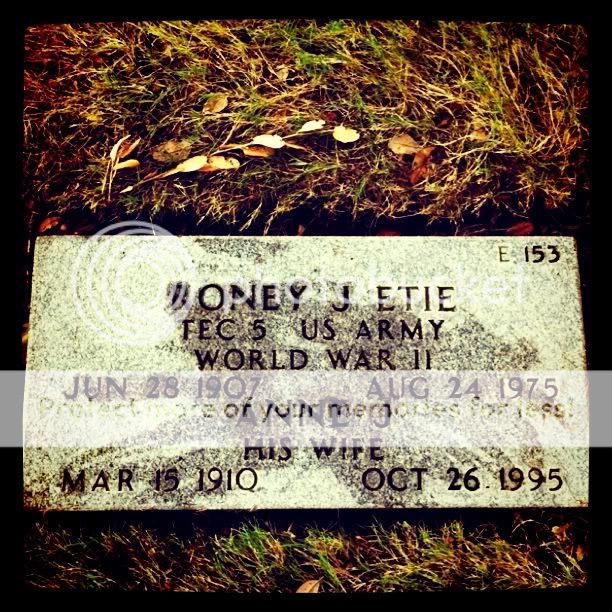
So, I tried RestingSpot.com’s app this
past weekend on the 2 family graves that I have near me here in the Houston
area, and it worked like a charm. My Great-Aunt Anne, who was one of the brave women who volunteered for the Navy’s W.A.V.E.S. [Women Accepted for Voluntary Emergency Service] and drove an ambulance in France during
World War II, has now been GPS’d. And being such a forward-thinking woman for
her time, I gotta think she got a big kick out of me capturing her location,
entering her vitals, taking a photo of her and her husband’s tombstone, and
uploading all of the data to RestingSpot.com’s website with my handy-dandy iPhone. And? Yes, I’d
already taken a photo of her tombstone previously, but it doesn’t hurt to go
and visit again, right? To make sure everything is as it should be, right? To
pay a visit to a woman who risked so much for her country? I’m not *that* busy.
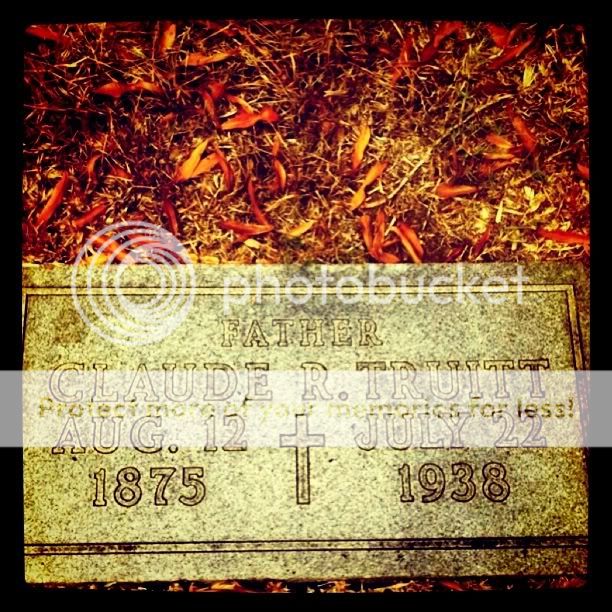
And the second family member’s
tombstone that I visited this past weekend? The Jerk’s. You know, Claudius RoyTruitt, my Gran’s dad? According to my mom, he was a jerk. Don’t know why she
thought her grandfather was a jerk. But not knowing the “why” has never stopped
me before from finding out someone’s story. In fact, it’s quite the opposite
with me. And just in case my great-grandfather has any thoughts about him and
his tombstone “disappearing” before I can find out his story, I thought it best
to GPS the Jerk, too. He’s not going anywhere on my watch. [And, wow, the only
thing that’s been passed down about him is that he’s a jerk. How sad is that?] Now?
If anyone else in the family wants to visit the Jerk, well, now they can find
him easily.
Once you log onto the website, you can
add more information to each memorial. Such as:
- Paying respects
- Bio
- Personality [For Claudius? Jerk. Great-Aunt Anne? Courageous.]
- Professional
- Interests
- Photos & Video [Now, a video about Great-Aunt Anne? That would be fabulous!]
- Friends & Family
There is also a map on the ancestor’s
page on RestingSpot.com marking the location of their tombstone, and directions
to it are just a click away. Want to share an ancestor’s resting spot? No problem with a
click you can share it by email with others.
Does it get any easier than this? Right
now, no. RestingSpot.com’s Smartphone app is truly a wonderful addition to the
genea-tech world. It combines simplicity and intuitiveness to make a
potentially frustrating ancestor visit to the cemetery an enjoyable experience allowing
us to write the family stories even quicker and more accurately while eating
Krispy Kremes, of course.
So go check RestingSpot.com out.
Download their app onto your Smartphone and give it a whirl. Go visit some
tombstones that you haven’t visited in a while. What are you waiting for? Go
GPS your ancestors’ tombstones.
[And? Turns out that the man who
requested the photo of Mr. Gressett’s tombstone is related to my college roommate.
You see, she’s from this itty bitty town in Texas and there were only 12 people
in her graduating class from a public school. So, I asked, and well, they’re
related. What are the odds, right? Genea-Karma.]
Note: While I was asked to review
their site and app (which are/were free), I received no compensation to do so from RestingSpot.com.
This is my honest and unbiased opinion. For more about my disclosure statement on Family Stories, click here.
~C
Sunday, September 18, 2011
My Memories Suite Giveaway

Lately I’ve been blogging here and on
my professional website, 4yourfamilystory.com, about how important it is to get
everyone in your family involved in genealogy and family history. Somehow. But
that's not always easy because they just don’t care about how you found out
something. They just want to know the good stuff.
Also, most people are visual and many
can be swayed by pretty and shiny things. [Even I’ve been known to do this. Can
you blame me? Jewels? Hello?!?] And when it comes to genealogy and family
history, stories with lots of pictures seem to be the bling that gets everyone’s
attention.
And that’s okay. Don’t be frustrated
by this. Go with it. Use it to your advantage. For example, if the only thing
that captures your Uncle Jerry’s attention is the photo of his grandfather from
World War I that you found, and he starts telling you stories about how it used
to freak him out when his grandpa would forget to put his teeth in the morning
and he (Uncle Jerry) had to go fetch his teeth from the drinking glass sitting
on the nightstand next to grandpa’s bed, does it matter? How about when good ol’
Uncle Jerry suddenly remembers he has this box of grandpa’s up in the attic and
he thinks there’s some stuff from World War I that he wouldn’t mind going up
there and getting for you?
I don’t know about you, but I’d be
showing the genealogy and family history bling to all of my relatives as much
as possible. In fact, I’d shine up the bling a wee bit. You know, make people “Ooh!”
and “Ahh!” over it. Make people talk about it. Make people talk about their
family. Make people talk about their stories. Make people talk about their
history. [Plus win points with the older folks in the family.]
So, by now you’re probably thinking, “I
get it, Caroline. It’s okay if my family members don’t appreciate all the sweat
and tears I put into my family history research, but how do I make my photos
and stories into genealogy and family history bling?”
Well, you know for a while now that I
do digital scrapbooking for my blogs. Some have commented on it, and many have
asked me how I do it. I do a lot of it from scratch using Photoshop Elements 7,
but that’s not easy. It’s taken me forever to figure everything out. Two big
books and 3 years later, it’s still not easy, and I get distracted because
there are too many options. It’s not something I’d recommend for the faint of
heart.
But don’t despair. Several weeks ago,
MyMemories.com contacted me and asked if I’d review their scrapbook software,
My Memories Suite. Hello?!? That’s a no-brainer for me. Play with some
scrapbook software given to me and in exchange give my honest unbiased opinion
about it? Duh. “Sign me up,” was my reply.
And? Loved it. What I like best about
it is that it’s intuitive and e-a-s-y. It’s made to do one thing. Digital scrapbook.
Unlike photo editing software powerhouses like Photoshop, you jump in and
create an album with however many pages you want then decide what kind of “output”
you want. The “output” being:
- Photobook
- Calendar
- JPG image to export to your hard drive [and then other places like your blog]
- Printer
- Interactive album
- iPod movie
- Movie
- DVD video
That’s right. You create it once then
you can use it many times in many ways. [We’re bound and determined to get
those family members interested. Whatever it takes. Remember?]
Because I always have so many people
ask how I did certain layouts on my blog, I decided to show you 4 different
kinds of layouts that I did using My Memories Suite all using the JPG image
export option. That’s right. Examples of how to bling up your genealogy and
family history stories and photos on your blog.
1. One aspect that I like about My
Memories Suite is that you have the option to use pre-made “Quick Pages” where
all you have to do is enter the photo(s) and some writing [“Some” is the key
word. Heaven forbid you make your family members read too much, right?] Anywho,
this was kind of hard for me to do because I’m creative, and I don’t like
giving up the control. However, once I did it, I realized it was kind of
freeing not having to do anything but stick the photo in it and add some words.
[Who knew?] The following is a photo given to me by a distant cousin [and I’m
using it with permission]. It’s small and scanned at low resolution and orange-y,
and as researchers you know that photos come to us in all shapes and sizes. So,
with a “if you can’t beat ‘em, join ‘em” attitude [And OMG, it’s a photo of my
3rd
great-grandparents enthusiasm.], I found a “Quick Page” layout ~"Splendor"~ that complimented
the orange-y-ness. [So there.] I think it took all of about 3 minutes to do. [Seriously.]
Now, you tell me. What family member isn’t going to ask me about this [Click image for a bigger view.]:

So, even if you aren’t creative, you
have no excuses for not exhibiting some family history bling using Quick Pages
on your blog. It’s so easy, even my Pug, Millie, could do it. [Okay. She can’t.
It’s that whole no “poseables” thing. But? You have thumbs. No excuses.]
2. In this second example, I did a kind
of hybrid layout using their "Ancestors Legacy" kit. It wasn’t completely “done” for me. I chose the photo layout
part from a list in the software then added the digital paper and elements and
drop shadows. So, I didn’t have to think about how or where to place the
photos. That was done for me. [And doesn’t it look professional?] But I got to
design, to create, and to play. You know, the fun stuff. I really enjoyed doing
this. And doesn’t my Paw Paw [Yeah. Big Paw Paw’s 4th wife ~ after
being his mistress. *rollingeyesheavenward* ] look absolutely gorgeous? [After
seeing these pics, it’s not hard to see why Big Paw Paw’s wandering eye
wandered onto her, is it?] [Click image for a bigger view.]

3. In this example, I decided to show
the capabilities of the software without using any of their kits [either bought
or the ones that come with the software]. You might recognize one photo that I
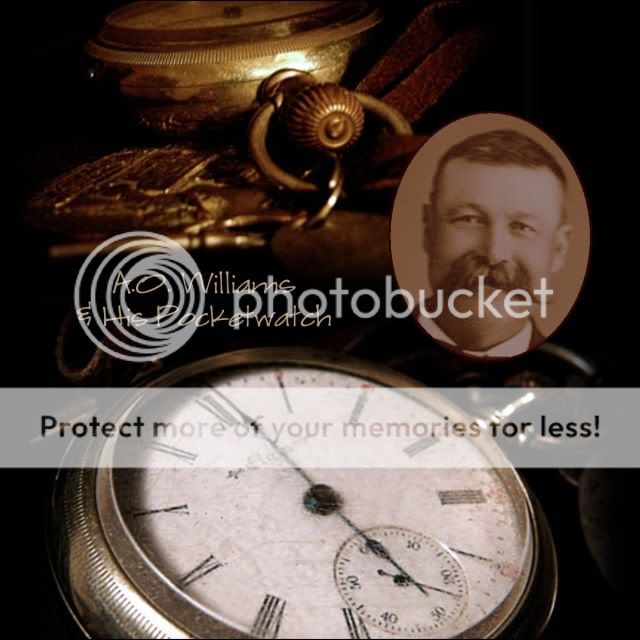
posted previously on this blog. The one of the 2 views of a pocket watch. Since
I did that post of my husband’s 2nd great-grandfather’s [A.O.
Williams’] pocket watch, I received a photo of him from Great-Uncle Donald last
year. So I cropped the photo of A.O.Williams in My Memories Suite, added it to
the pocket watch photo, and added his name. And presto! An instant winner with
the family, eh? [Click image for a bigger view.]
4. Now, for my last trick. I decided
to show you how you can take a boring document [Well, not boring to me and you,
but boring to our family members. Remember: document = reading = family members get
bored.] and make it come alive. Here is Harve and Pearl Pointer’s original
mortgage paperwork for their farm in Story County, Iowa. [Pearl was A.O.
Williams’ daughter.] So, I added 2 pics of the farm [which is no longer there]
and a pic of Harve and Pearl from about 6 years before this mortgage. Makes it
real, doesn’t it? I challenge any family member to say “Whoop-de-do,” to this. [Seriously.]
All photo placement and decorating was done by me using the "Family Memories Pack" kit that I purchased
from MyMemories.com. [Click image for a bigger view.]

Contest
MyMemories.com has given me an extra
My Memories Suite Scrapbook Software [RV $39.95] for one (1) lucky reader. [Feeling lucky?]
How
to enter:
You must go visit MyMemories.com and do some “window
shopping,” find the digital scrapbook kit that you absolutely positively cannot
live without, come back here to Family
Stories, and tell me in the comments below which kit you picked and leave me your email address. You can use the word "at" for @ and "dot" for "." to reduce spam. [I’ll need to notify you if you win. I’m
not psychic. Unfortunately.]
Want
some additional entries? [Optional]
Below are some additional ways to
enter. Remember, though, these aren’t valid if you do not first go
and pick the digital scrapbook kit of your dreams at the MyMemories.com store and tell me which one it is in the
comments below. [I’m ornery like that.] Each one is worth 1 entry.
- Follow @FamilyStories on Twitter [1 entry]
- Friend me on Facebook [1entry]
- Follow my Family Stories blog through Google Friend Connect in sidebar [1entry]
- Like this blog post [at bottom of post] [1 entry]
- Tweet this blog post [at bottom of post] [You can tweet this blog post once per day, make a comment each time, & each 1 counts as an entry.] [1entry per day]
- Go make a relevant comment on my Why Aren’t We Doing It? #FGS2011 blog post on my other site, 4YourFamilyStory.com [1 entry]
- Like MyMemories.com on their Facebook page [Plus? They have a $5 coupon over there for their store.] [1entry]
- Follow the MyMemories.com blog on Google Friend Connect [1 entry]
- Follow MyMemories.com on Twitter [1 entry]
- Subscribe to MyMemoriesSuite YouTube Channel [1 entry]
Also? For each additional entry, you must enter a new comment. For example:
If you’ve picked “Ancestors Legacy Kit”
as your fave from their store; followed me on twitter; liked the MyMemories Facebook page; and followed
my blog on Google Friend Connect, then you’d make 4 separate comments and that
would give you 4 entries into the contest.
Want
3 additional entries?
For you overachievers, link to this contest blog post from your blog. [Don’t
forget to make 3 separate comments leaving me a link to your blog post where
you’ve linked to this blog post for these entries. And if you understand &
complete all that, you definitely deserve 3 entries.]
If you already follow me on twitter or
somewhere else that’s listed above, then that counts and just say you’re
already doing it in a separate comment.
This
contest begins Monday, 19 Sep 2011 and ends Monday, 26 Sep 2011. Winner will be announced Wednesday, 28
Sep 2011. [Or perhaps earlier if not many enter. But? Why wouldn't you enter?]
Don’t want to wait and see if you win
in order to start making family history bling on your blog? Okay.
MyMemories.com has given me a coupon to give to y’all worth $10 off the purchase
of My Memories Suite Scrapbook software. Just enter in this code at checkout STMMMS76098 (For best results, just copy and paste it).
And? You also get a $10 coupon for the MyMemories.com store when you purchase
the software.
Wait.
There’s more.
Don’t forget there’s a $5 coupon towards
any of their kits in their store waiting for you when and if you go like the
MyMemories.com Facebook page.
So. What are you waiting for? You only
have to enter once by telling me your fave kit from the MyMemories.com store in
the comments below. There will only be one randomly-picked winner. But
remember: the more entries you make, the more chances you have of winning.
Questions? Click the red “Contact” button in the left hand corner of your screen.
[Disclosure: MyMemories.com gave me a free copy of My Memories Suite software to use and review and to promote this giveaway. All of my opinions are my own. MyMemories.com is also providing a free copy of the software for the lucky winner of this giveaway.]
~C
Friday, September 9, 2011
How Popular is #Genealogy in Springfield, IL?
How popular is genealogy in Springfield, IL? Popular enough that the local T.V. channels came by for a press conference yesterday morning. Here is a video of D. Joshua Taylor announcing the opening of the Federation of Genealogical Societies' 2011 Conference:
Cool, yes? [Yeah. I remembered I could shoot video on my iPhone. Watch out world.]
And? I was also mentioned in the local paper. That's right. The hotel that I'm staying in had recently renovated their rooms. And the local paper interviewed guests to see how we liked it. Here's a link to the online version of the article: http://www.sj-r.com/business/x219207891/President-Lincoln-Hotel-seeks-that-wow-effect
And? For you numbers people: over 2000 attendees representing 48 states and 5 countries.
So, how popular is genealogy in Springfield, IL? Very popular.
~C
Cool, yes? [Yeah. I remembered I could shoot video on my iPhone. Watch out world.]
And? I was also mentioned in the local paper. That's right. The hotel that I'm staying in had recently renovated their rooms. And the local paper interviewed guests to see how we liked it. Here's a link to the online version of the article: http://www.sj-r.com/business/x219207891/President-Lincoln-Hotel-seeks-that-wow-effect
And? For you numbers people: over 2000 attendees representing 48 states and 5 countries.
So, how popular is genealogy in Springfield, IL? Very popular.
~C
Friday, September 2, 2011
The Situation of Family & Genealogy
Don’t you get
tired of that look? That glazed-over look? That blank stare? You know, the look
you get when, in response to a family history question from a family member,
you start explaining in great detail how you were able to find that small (And
I mean, small.) village in what is now Poland, but once was a part of the
Prussian Empire, where your great-grandfather was born.
And what I
have to say next is going to shock and even dismay you. So sit down and get
comfortable before reading any further. Ready?
- They could care less about how you successfully – after years and years of searching and pulling your hair out – found the name of that small (And I mean, small.) village in Poland that your great-grandfather was born in.
- They don’t care that your great-grandfather no doubt repeated several times for the clerk the name of that small (And I mean, small.) village so that the clerk could phonetically spell it on his declaration of intent to become a citizen of the United States.
- They don’t care that you spent days and days closing your eyes and sounding out the name of the small (I mean, small.) village trying to come up with possible spellings.
- They don’t care that you spent days and days Googling those silly spellings.
- They don’t care that you stared at his passport application and that blob of ink, that should have correctly identified that small (I mean, small.) village, did not once morph into perfectly shaped letters.
- They don’t care that you went through all the towns and cities that begin with the letter “G” listed in an index of a current European atlas hoping you can find one that sounds like the one phonetically spelled out on his declaration of intent.
- They don’t care that there are, like, a gazillion towns and cities in that index that start with the letter “G” or that you are practically blind now because of how small the type is in that index.
- They don’t care that you have spent countless hours poring over old maps online and offline looking for that small (I mean, small.) village.
- They don’t care that you bought a subscription to an historic map site so you could find that small (I mean, small.) village.
- They don’t care that you absolutely must have the name of that small (I mean, small.) village in order to go back any further.
- They don’t care that you queried on Twitter with a Twit Pic a Photoshop-enhanced copy of his passport application hoping that someone could see what you had not.
- They don’t care that you only received 2 responses, one of which was a good-hearted person from Germany who was unsuccessful at identifying that small (And I mean, small.) village.
- They don’t care that the second response led you to a site that led you to another site that had a database that allowed wild card searching of names of current and former cities and villages of the former Prussia and what is now Poland, where that small (And I mean, small) village was found.
- They don’t care that that village is so small (And I mean, small.) it probably only exists today because it’s an archaeological site.
Basically?
They don’t care about all those details. And let’s face it. We do what we do
because we love those details. We don’t just live in those details. We revel in
them. For us, the difference between generations is in the details. The
difference between failure and success is in those details.
And our loved
ones? What do they care about? I’ll tell you what they care about.
- They care whether this same great-grandfather’s son, Big Paw Paw, fathered any other children with his many mistresses and/or wives.
- They want to know the details of Big Paw Paw’s will, and why he wrote it the way he did.
- They want to know why, if she’s still living, you haven’t contacted Big Paw Paw’s last mistress. (Awkward, much?)
- They want to see Big Paw Paw’s photos, and, wow, wasn’t he good looking?
- They want to know every last detail about each of Big Paw Paw’s divorces.
- They want to know why Big Paw Paw sued his sister.
- They want to know why Big Paw Paw was kicked out of his family.
- They want to know why Big Paw Paw was excommunicated from the Catholic Church.
That’s right.
While you’ve been carefully crafting research work that would (in your dreams)
be worthy of The History Channel,
your loved ones just want to know how the family compares to an episode of Jersey Shore.
So what to
do? Don’t force the details on your family. [Yes. Give them ‘Snooki’ and ‘The Situation.’] Give them what they want in the format they’ll appreciate. Give
them the stories, the photos, and give them a chance to add to all of that in a
way they can understand. By engaging family members in a non-technical way, you’re
more likely to get their input, their stories, their rumors, their secrets, and
– dare I say – their details that may be just what you need to find the parish
your great-grandfather was more than likely baptized in near that small (And I
mean, small) village ~ all without that glazed-over look in their eyes.
Are you going
to the Federation of Genealogical Societies conference (FGS2011) next week in
Springfield, IL? Join 1000memories.com Thursday morning, Sept. 8th at their Engaging Your Family in Genealogy breakfast
panel. I’ll be in attendance, but if that doesn’t do it for you [grin], D.
Joshua Taylor (Co-chair 2011 FGS Conference), Dear Myrtle (Pat Richley), and Jonathan
Good (Co-founder 1000memories) will be on the panel. Space is limited and you
must RSVP. For more information please visit the 1000memories.com
blog.
~C
Subscribe to:
Posts (Atom)
LinkWithin
